Async Code in Node.js
Why Callbacks Exist, Why They Hurt, and What Promises Actually Fix
You've probably heard that Node.js is "non-blocking." That phrase gets thrown around like confetti, but what does it actually mean for the code you write every day? Let's unpack it — starting from the real problem, not the textbook definition.
The Real World Doesn't Wait. Neither Should Your Server.
Imagine you're building a simple feature: read a user's profile from a file, process it, then send it back. Sounds easy, right?
Here's the thing — reading a file takes time. Not human-time, but computer-time, which is still enormous compared to how fast the CPU can execute logic. If Node.js sat there waiting for the file read to finish before doing anything else, your entire server would freeze for every single request. That's a disaster when you're handling hundreds of users.
This is why async code exists in Node.js. It's not a quirk — it's the entire point. Node runs on a single thread, and that thread can't afford to block. So instead of waiting, it registers a "hey, call me when you're done" — and moves on.
That "call me when you're done" mechanism? That's a callback.
Callbacks: The OG Async Pattern
A callback is just a function you pass to another function, with the agreement that it'll be called later — once the async work finishes. Node's built-in fs module is the classic example.
const fs = require('fs');

fs.readFile('user-profile.txt', 'utf8', function(err, data) {
  if (err) {
    console.error('Something went wrong:', err);
    return;
  }
  console.log('Got the data:', data);
});

console.log('This runs BEFORE the file is done reading');
Walk through what happens here:
fs.readFilekicks off the file read — but doesn't wait for itExecution immediately continues to the
console.logat the bottomOnce the OS finishes reading the file, Node puts your callback in the event loop queue
Your callback runs — with either an error or the data
Notice the err parameter comes first. That's a Node.js convention called "error-first callbacks." If something goes wrong, err has the details. If everything's fine, err is null and data has your result. Every core Node API follows this pattern, so once you see it once, it's everywhere.
Here's a mental model that helps: think of it like ordering food at a restaurant. You don't stand at the counter until your burger is cooked. You get a buzzer, go sit down, do other things, and the buzzer fires when it's ready. The callback is the buzzer.
When Callbacks Eat Themselves
So callbacks work. But they have a problem that doesn't show up until your logic gets just a little bit complex.
Let's say, after reading the user profile, you need to check their permissions from another file, and then fetch their settings. Suddenly your code looks like this:
fs.readFile('user-profile.txt', 'utf8', function(err, profile) {
  if (err) return handleError(err);

  fs.readFile('permissions.txt', 'utf8', function(err, permissions) {
    if (err) return handleError(err);

    fs.readFile('settings.txt', 'utf8', function(err, settings) {
      if (err) return handleError(err);

      // Finally do something useful
      processUser(profile, permissions, settings);
    });
  });
});
This is "callback hell" — or, as some developers call it, the "pyramid of doom." Each step has to live inside the previous one, because that's the only way to access the result. The indentation alone tells a story of pain.
Here's the execution flow, visualized:
readFile('user-profile.txt')
  └── callback fires → readFile('permissions.txt')
        └── callback fires → readFile('settings.txt')
              └── callback fires → processUser()
It's a chain — but each link is buried inside the previous one. The problems compound fast:
Error handling is copy-pasted at every level
Reading the code top-to-bottom doesn't match execution order
Adding one more step means another level of nesting
Debugging means mentally unwinding the pyramid
Honest question: would you want to maintain that code six months later?
Promises: A Different Mental Model
A Promise is an object that represents a value that will exist eventually — or a failure if something goes wrong. Instead of passing a callback into a function, the function returns a Promise, and you chain .then() and .catch() onto it.
Here's the same file read, rewritten with a Promise:
const fs = require('fs').promises;

fs.readFile('user-profile.txt', 'utf8')
  .then(function(data) {
    console.log('Got the data:', data);
  })
  .catch(function(err) {
    console.error('Something went wrong:', err);
  });
Cleaner already. But the real power shows up when you chain multiple async steps:
fs.readFile('user-profile.txt', 'utf8')
  .then(profile => fs.readFile('permissions.txt', 'utf8'))
  .then(permissions => fs.readFile('settings.txt', 'utf8'))
  .then(settings => processUser(profile, permissions, settings))
  .catch(err => handleError(err));
Compare that pyramid to this flat chain. Each .then() receives the result of the previous one and returns a new Promise. The indentation stays constant no matter how many steps you add. One .catch() at the end handles errors from any step in the chain.
That's not just aesthetics — it's a fundamentally different way of composing async logic.
The Promise Lifecycle (What's Actually Happening)
A Promise can be in exactly one of three states at any time:
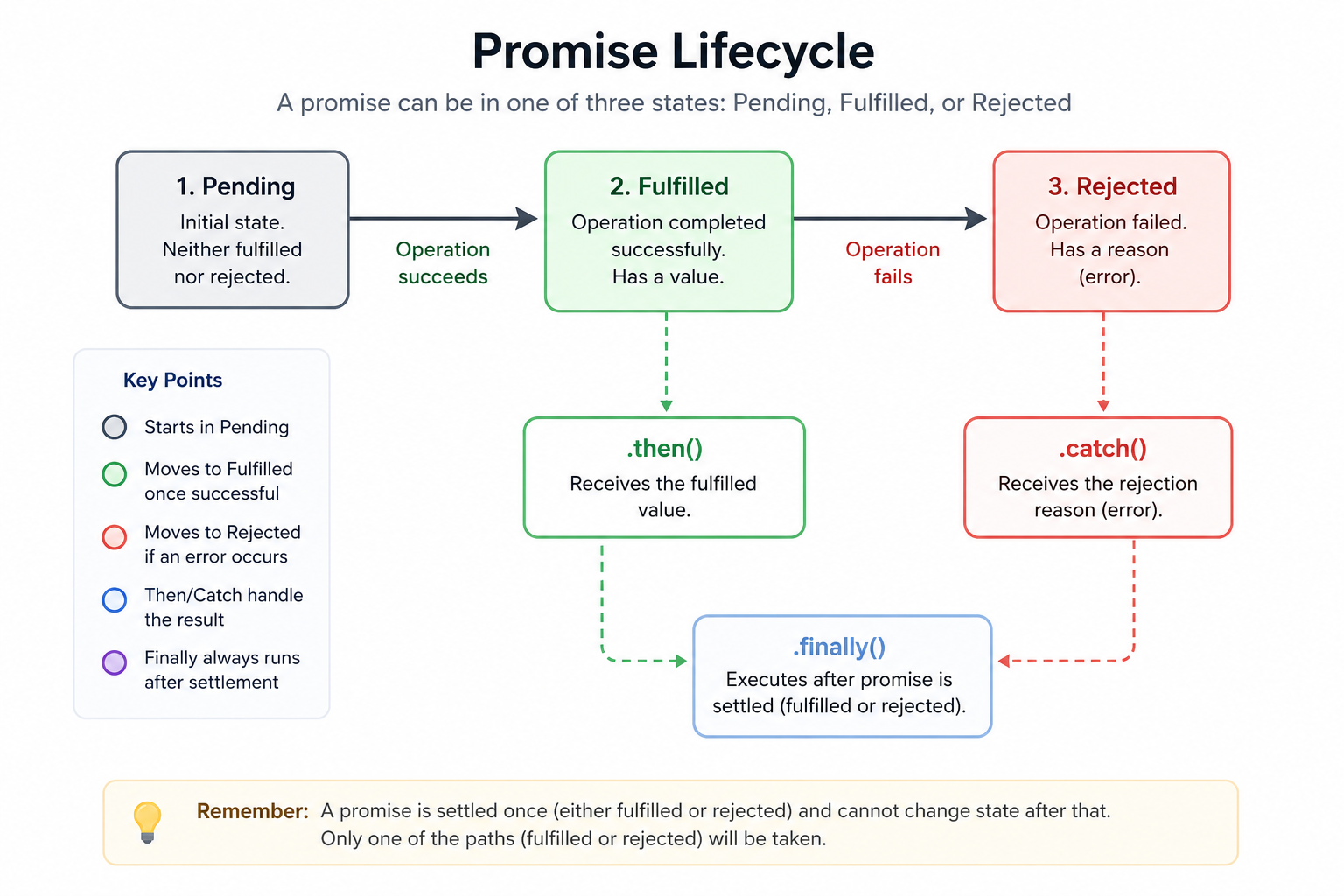
Once a Promise moves from Pending to either Fulfilled or Rejected, it stays there. It's immutable. You can attach .then() handlers after the fact and they'll still fire correctly — unlike callbacks, which only fire once at a specific moment.
You can also create your own Promises when working with older callback-based APIs:
function readFilePromise(filename) {
  return new Promise(function(resolve, reject) {
    fs.readFile(filename, 'utf8', function(err, data) {
      if (err) reject(err);
      else resolve(data);
    });
  });
}
This "promisification" pattern wraps a callback API in a Promise shell. It's how a lot of legacy Node code gets modernized — one function at a time.
Why Promises Win (Mostly)
Let's be direct about what changed:
Error handling: With callbacks, you check err at every level. With Promises, one .catch() catches everything upstream. Miss an error check in callbacks? Silent failure. With Promises? The rejection propagates automatically.
Composition: Promises are values — you can pass them around, store them in arrays, combine them with Promise.all() to run multiple async operations in parallel:
Promise.all([
  fs.readFile('user-profile.txt', 'utf8'),
  fs.readFile('permissions.txt', 'utf8'),
  fs.readFile('settings.txt', 'utf8')
]).then(([profile, permissions, settings]) => {
  processUser(profile, permissions, settings);
}).catch(handleError);
That reads three files in parallel and waits for all of them. Try doing that cleanly with callbacks.
Readability: The linear chain reads almost like synchronous code. Top to bottom. No pyramids.
A Note on What Comes Next
Promises aren't the final form. async/await — introduced in ES2017 — is syntactic sugar on top of Promises. Under the hood it's still Promises; the syntax just makes async code look almost identical to synchronous code. But to really understand async/await, you need Promises first. They're the foundation.
Callbacks taught us the shape of async. Promises gave us the tools to manage it. And every modern Node.js codebase — from Express middleware to database queries in Prisma to HTTP calls with node-fetch — runs on this foundation.
So the next time you see .then(), you know exactly what you're looking at.